XFS Optimization and Troubleshooting

XFS — A Reference Architecture
A practical, layered view of the XFS filesystem: what it is, how it is structured on disk, and the tradeoffs that fall out of those design choices. Aimed at engineers and architects choosing a filesystem for production workloads — not at kernel hackers, but deep enough to be useful when something goes wrong.
1. Overview
XFS is a 64-bit journaling filesystem originally developed by SGI for IRIX in 1993 and ported to Linux in 2001. It has been the default filesystem in RHEL/CentOS/Rocky/Alma since RHEL 7 and is a first-class option across enterprise Linux. Its design priorities, in order, are scalability, parallelism, and metadata performance — particularly for large files and large filesystems.
It is mature, well-supported, and conservative in ways that matter for production: the on-disk format is stable, recovery semantics are well understood, and the tooling around it (xfs_repair, xfs_db, xfs_io) is unusually capable.
2. Design Principles
| Principle | What it means in practice |
|---|---|
| Parallelism via Allocation Groups | The filesystem is partitioned into independent regions, each with its own metadata, allowing concurrent allocation and I/O |
| B+ trees everywhere | Free space, inode allocation, directory entries, extent maps, reverse maps, reference counts — all O(log n) lookups |
| Extent-based allocation | Variable-length runs of contiguous blocks rather than per-block bitmaps |
| Metadata journaling | Only metadata is journalled; data integrity relies on ordering, CRC, and the application |
| Delayed allocation | Block allocation deferred until writeback to maximise contiguity |
| 64-bit throughout | Block addresses, inode numbers, file offsets — all 64-bit, no scaling cliffs |
| Online operations | Grow, defragment, partial repair without unmount |
3. Top-Level Filesystem Layout
An XFS filesystem is composed of three logical regions:
| Region | Required | Purpose |
|---|---|---|
| Data section | Yes | Allocation Groups (AGs) — all user data and most metadata |
| Log | Yes | Metadata write-ahead log; internal (within the data section) or external (separate device) |
| Real-time section | No | Optional secondary region with deterministic allocation and no AG overhead |
The data section dominates. The log is small (typically tens to hundreds of MiB). The real-time section is rare outside specialised media workloads.
4. Allocation Groups
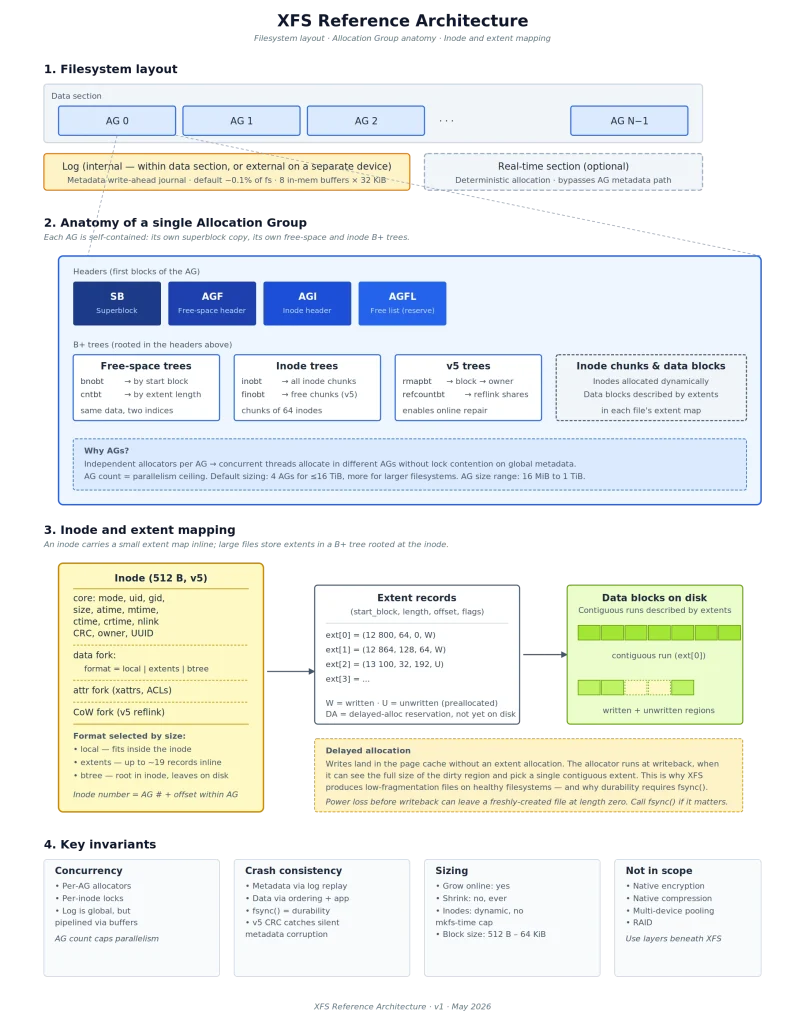
The Allocation Group is XFS’s fundamental architectural unit. The data section is divided into N AGs, each between 16 MiB and 1 TiB in size. mkfs.xfs picks an AG count that balances parallelism against overhead — typically 4 AGs for filesystems up to ~16 TiB, more for larger devices.
Each AG is self-contained: it has its own free-space tracking, its own inode allocation, and its own copy of the superblock. Independent threads can allocate from different AGs without contending on global structures. This is the single design choice that most defines XFS’s behaviour.
4.1 AG Headers
Every AG begins with a small set of headers occupying the first few blocks:
| Header | Purpose |
|---|---|
| Superblock (SB) | Primary copy lives in AG 0; every other AG holds a backup copy used by xfs_repair |
| AGF | Root pointers for the free-space B+ trees |
| AGI | Root pointers for the inode B+ trees |
| AGFL | Free list — a small pool of pre-reserved blocks for B+ tree operations, so tree splits never deadlock waiting for free space |
4.2 AG-Local B+ Trees
| Tree | Indexed by | Purpose |
|---|---|---|
| bnobt | Starting block number | Find free extents adjacent to a target location |
| cntbt | Extent length | Find a free extent of at least N blocks |
| inobt | Inode number | Locate any inode chunk |
| finobt | Inode number (free chunks only) | Fast allocation of new inodes (v5) |
| rmapbt | Owner | Reverse mapping — given any block, find what owns it (v5) |
| refcountbt | Block number | Reference counts for reflink-shared extents (v5) |
The two free-space trees (bnobt and cntbt) index the same data in two different ways — one for spatial locality, one for size matching — so the allocator can answer both “place this near block X” and “find me a free extent of at least N blocks” without scanning.
5. Inodes
Inodes are allocated dynamically, in chunks of 64, as files are created. A fresh filesystem carries no inode tax; maximum file count is bounded by free space rather than by a mkfs-time decision.
| Property | Value |
|---|---|
| Default inode size | 512 bytes (v5) |
| Allocation unit | Chunks of 64 inodes |
| Inode number | Encodes AG number + AG-relative offset |
| Forks per inode | Data fork (always), attribute fork, optional CoW fork (v5 reflink) |
5.1 Inode Formats
An inode’s data fork can take one of three formats depending on file size and type:
| Format | Used when | Storage |
|---|---|---|
| Local | Small files, short symlinks, small directories | Data lives inline in the inode itself |
| Extents | Up to roughly 19 extents | Extent records packed into the inode |
| B+ tree | More than fits inline | Inode holds the root of an extent B+ tree |
The “local” format is why XFS handles symlinks and small directories with no extra block reads — they fit entirely within the inode that describes them.
6. Extents and Block Mapping
XFS does not maintain per-block allocation bitmaps. Instead, files and free space are described as extents — (start_block, length, offset, flags) tuples. A 1 GiB contiguous file uses one extent record; a heavily fragmented 1 GiB file might use thousands. With delayed allocation and healthy free space, extent counts stay low and metadata overhead is small.
Reading or writing a sparse 4 KiB region of a 100 GiB file involves a B+ tree lookup in the inode’s extent map and then the I/O. No bitmap walk, no indirect-block chain.
7. The Log
XFS uses a physical metadata journal. Every metadata change writes a pre-image and post-image to the log; on crash, the log is replayed to bring metadata to a consistent state.
| Aspect | Detail |
|---|---|
| Type | Metadata only — data blocks are never logged |
| Location | Internal (default, in the data section) or external (separate device, -l logdev=) |
| In-memory buffers | 8 by default (logbufs=), 32 KiB each (logbsize=) |
| Sizing | mkfs auto-sizes (typically ~0.1% of the filesystem, capped); larger logs help metadata-heavy workloads |
| Recovery | Automatic on mount; replays committed transactions |
An external log on a fast device (NVMe, NVRAM, or a battery-backed write-cache) reduces metadata commit latency dramatically for workloads with synchronous fsync() patterns — databases, mail servers, message brokers.
8. Delayed Allocation
Writes land in the page cache without block allocation. Allocation is deferred until writeback, at which point the allocator sees the full size of the dirty region and can pick a contiguous extent.
This is the primary reason XFS produces highly contiguous files on healthy filesystems — but it widens the window in which a power failure can leave a recently written file as zero-length (the inode was created but blocks were never allocated). Applications that need durability must call fsync(). This was the source of the infamous “XFS zeroes my files” complaints from a decade ago, and is the reason ext4 shipped auto_da_alloc to mimic some of XFS’s behaviour while papering over naive write-then-rename patterns.
9. v5 (CRC) Features
Filesystems formatted with crc=1 (default since 2014) use the v5 on-disk format, which adds:
| Feature | Benefit |
|---|---|
| Per-metadata-block CRC32c | Detects silent corruption in all metadata blocks |
| Per-block UUIDs | Catches blocks accidentally written to the wrong filesystem |
| Block ownership in headers | Catches metadata-block confusion |
Sparse inodes (spinodes) | Allocates partial 64-inode chunks when free space is fragmented |
finobt | Fast free-inode lookup; accelerates create-heavy workloads |
rmapbt | Reverse mapping; foundation for online repair and reflink |
| Reflink | Copy-on-write data sharing between files — powers cp --reflink, snapshots, dedupe |
| Bigtime (kernel ≥ 5.10) | Timestamps extend beyond 2038 |
inobtcount, nrext64 | Faster mount; larger per-inode extent counts |
If you are formatting a filesystem today, v5 is the only sensible choice. The CRC overhead is negligible; the corruption-detection gain is substantial.
10. Operational Tooling
| Tool | Purpose |
|---|---|
mkfs.xfs | Format-time configuration: block size, AG count/size, log size/location, inode size, feature flags |
xfs_info | Display the geometry of a mounted filesystem |
xfs_growfs | Online grow (XFS cannot shrink) |
xfs_repair | Offline check and repair — the filesystem must be unmounted |
xfs_scrub | Online metadata verification (kernel + userspace, v5 only) |
xfs_db | Read/write debug access to on-disk structures — forensic, dangerous |
xfs_io | Userspace harness for I/O syscalls — fallocate, hole punch, reflink, direct I/O |
xfs_quota | User/group/project quota management |
xfs_fsr | Online filesystem reorganiser — defragmenter |
xfs_bmap | Show a file’s extent map |
xfsdump / xfsrestore | Native backup with full attribute and ACL fidelity |
11. Performance Topology
| Knob | Effect |
|---|---|
| AG count | Parallelism ceiling — too few causes lock contention, too many wastes overhead |
| Log size and location | Bigger log helps metadata-heavy workloads; external log helps fsync-heavy workloads |
allocsize mount option | Speculative preallocation size — larger reduces fragmentation but holds free space |
logbsize, logbufs | Log buffer count and size — tune for high metadata throughput |
inode64 | Allow inode allocation across the whole filesystem (default on modern kernels) |
noatime / relatime | Skip atime updates — reduces metadata writes |
| Real-time subvolume | Bypass AG metadata path for predictable latency (rare in general workloads) |
A useful rule of thumb: workloads that bottleneck on metadata operations want more AGs and a larger log. Workloads that bottleneck on streaming I/O want fewer, larger AGs and aligned stripe parameters (sunit / swidth) matching the RAID geometry underneath.
12. When XFS Fits — and When It Doesn’t
| Good fit | Poor fit |
|---|---|
| Large files (media, scientific datasets, VM images) | Many tiny files in a tiny filesystem (overhead dominates) |
| Large filesystems (multi-TB, multi-PB) | Workloads that need shrink |
| High-parallelism workloads (databases, file servers, container hosts) | Write-once-then-delete with deep nesting and churn |
| Streaming and sequential I/O | Workloads needing native filesystem-level encryption (use dm-crypt below XFS) |
| RHEL-family environments where it is the default | Workloads needing native transparent compression (use Btrfs or ZFS) |
| Reflink-based snapshots and dedupe | Workloads where COW everywhere is desired (use Btrfs or ZFS) |
13. Security Posture
| Concern | XFS position |
|---|---|
| Silent corruption | Mitigated by v5 CRC for metadata; data blocks rely on the application or the device layer for integrity |
| Encryption | No native fscrypt. Encrypt at the block layer with LUKS / dm-crypt, or at the application layer |
| Quotas | User, group, and project (directory-tree) quotas — useful for multi-tenant containers and shared storage |
| Per-inode flags | append-only, immutable, no-dump, sync — supported via chattr |
| Xattrs and ACLs | Full POSIX ACL and extended attribute support |
| Audit | Metadata operations are journalled, but the log is for crash consistency, not audit retention; pair with auditd for security audit |
| Reflink and integrity | Reflink shares blocks via the reference-count B+ tree; a write to one of the sharing files triggers CoW and severs the share, so reflink itself does not expose data between files |
14. Architectural Diagram

15. Further Reading
- XFS Algorithms & Data Structures — Dave Chinner et al., the canonical on-disk format reference, maintained in the kernel tree under
Documentation/filesystems/xfs/ man 5 xfsandman 8 mkfs.xfs— succinct and accuratexfsprogssource —xfs_dbin particular is the fastest way to develop intuition about the on-disk structures- The
fstests(xfstests) suite — the regression battery used to qualify every XFS change
Reference architecture, May 2026. Verify version-specific behaviour against the kernel and xfsprogs versions in your environment.

0 comments