WordPress Reference Architecture

A practical, layered view of WordPress as a platform, focused on Blocksy child themes as the customization vector. Written for engineers who need to make non-trivial changes to a Blocksy-based site without forking the parent, without breaking updates, and without painting themselves into a corner.
1. Overview
WordPress is a PHP/MySQL CMS organised around three coarse layers — core, plugins, theme — orchestrated by a request lifecycle that fires hundreds of action and filter hooks along the way. Blocksy is a popular Gutenberg-first theme with a deep configuration surface: a Customizer-driven header/footer builder, content-area modules, a custom-properties-based design system, the Blocksy Companion plugin that ships extensions, and an extensive hook API.
A child theme is the WordPress-blessed customization vector — a tiny package that declares Blocksy as its parent and selectively overrides theme.json, templates, assets, and hook callbacks without ever editing the parent. Parent updates ship cleanly, customizations live in version control, and the surface you maintain stays small.
2. Design Principles
| Principle | What it means in practice |
|---|---|
| Hooks over template overrides | Hooks survive parent updates; template copies need re-syncing on major releases |
| Configuration over code | Use the Customizer and theme.json before reaching for PHP |
| Composition over forking | Add to Blocksy; don’t replace it. If you need to replace large chunks, pick a different parent |
| One source of truth per token | A design token (colour, font) lives in either Customizer or theme.json — never both |
| Version-controlled child, untouched parent | Parent and plugins are deployable artefacts; only the child theme carries your code |
| Conditional everything | Enqueue assets, run hooks, register CPTs only where needed |
| Escape on output, sanitize on input | The two non-negotiable rules of WordPress PHP |
3. The Stack
WordPress sits on a conventional LEMP (or LAMP) stack. The child theme operates at the application layer but its decisions reach down (database queries, asset bytes) and up (caching, edge).
| Layer | Component | What lives here |
|---|---|---|
| Edge | Cloudflare / CDN / WAF | TLS termination, DDoS, edge caching |
| Web server | Nginx or Apache | Static assets, reverse proxy to PHP-FPM |
| App server | PHP-FPM | WordPress execution |
| WP Core | wp-includes, wp-admin | Loader, query engine, rewrite, options API, hooks |
| MU-plugins | wp-content/mu-plugins | Always-on, can’t be disabled from the dashboard |
| Plugins | wp-content/plugins | Including Blocksy Companion |
| Parent theme | wp-content/themes/blocksy | Templates, hooks, design system, Customizer panels |
| Child theme | wp-content/themes/blocksy-child | Your overrides |
| Object cache | Redis / Memcached | Persistent options, transients, query cache |
| Database | MySQL / MariaDB | Posts, options, terms, meta |
| Storage | Local FS or S3-compatible | uploads/, media |
4. Request Lifecycle — Where the Child Theme Intercepts
A typical page render flows through:
- Web server routes to PHP-FPM
index.php→wp-blog-header.php→wp-load.php→wp-config.php→wp-settings.php- MU-plugins load, then active plugins load
- Parent theme
functions.phploads, then child themefunctions.phploads after_setup_theme→init→wp_loaded- Request parsing —
parse_request→parse_query→pre_get_posts→ main query template_redirect→template_include— template resolution- Render —
wp_head, header, content (blocks/templates), footer,wp_footer - Shutdown, response sent
The child theme can attach behaviour at any of these stages. The key intercept points:
| Stage | Hook | Use for |
|---|---|---|
| Theme setup | after_setup_theme | add_theme_support, image sizes, nav menus |
| Asset registration | wp_enqueue_scripts | Stylesheets and scripts (front-end) |
| Editor assets | enqueue_block_editor_assets | Editor-side styling and scripts |
| Query shaping | pre_get_posts | Modify main query before it runs |
| Template choice | template_include | Force a template for a given request |
| Render hooks | blocksy:*, wp_head, wp_footer, content filters | Inject markup, modify output |
| Shutdown | shutdown | Logging, cache warming |
5. Blocksy at a Glance
What the parent gives you out of the box:
| Capability | Where it lives |
|---|---|
| Header builder | Customizer → Header |
| Footer builder | Customizer → Footer |
| Content area design controls | Customizer → per content type (single, archive, page, WooCommerce) |
| Design tokens | Inline <style> from Customizer + theme.json |
| Blocksy Companion plugin | Extensions (Sticky Header, Trending, Cookies Consent, Demo Install, etc.) |
| Hook API | blocksy:* action and filter prefix |
| WooCommerce integration | Dedicated templates and Customizer panels |
| Pro features | Mega Menu, Local Google Fonts, Conditional Headers, Advanced Hooks, White Label |
Worth knowing: Blocksy is hybrid — not full-site-editing in the strict sense. Header, footer, and loops are Blocksy PHP renderers driven by Customizer settings; post content uses the block editor. Block templates work as overrides but are not the primary configuration surface. If you want a strictly FSE workflow, pick a strictly FSE parent.
6. Child Theme Anatomy
6.1 Minimum Viable Child
blocksy-child/
├── style.css        ← required, with Template: blocksy header
└── functions.php    ← enqueue parent + child styles
style.css header:
css
/*
Theme Name: My Blocksy Child
Template: blocksy
Version: 1.0.0
Text Domain: blocksy-child
*/
functions.php minimum:
php
<?php
defined('ABSPATH') || exit;

add_action('wp_enqueue_scripts', function () {
    wp_enqueue_style(
        'blocksy-parent',
        get_template_directory_uri() . '/style.css'
    );
    wp_enqueue_style(
        'blocksy-child',
        get_stylesheet_uri(),
        ['blocksy-parent'],
        wp_get_theme()->get('Version')
    );
});
6.2 Recommended Structure
blocksy-child/
├── style.css              ← theme header + a couple of resets
├── functions.php          ← bootstraps include files only
├── theme.json             ← design token overrides
├── screenshot.png         ← 1200×900, for the Themes screen
├── inc/
│   ├── enqueue.php        ← asset registration
│   ├── hooks.php          ← action/filter callbacks
│   ├── shortcodes.php
│   ├── cpt.php            ← custom post types & taxonomies
│   └── customizer.php     ← child-specific Customizer additions
├── templates/             ← FSE block template overrides
│   └── single.html
├── parts/                 ← block template parts
├── patterns/              ← reusable block patterns
├── woocommerce/           ← WooCommerce template overrides
└── assets/
    ├── css/
    ├── js/
    ├── fonts/
    └── images/
functions.php loader pattern:
php
<?php
defined('ABSPATH') || exit;

foreach (['enqueue', 'hooks', 'shortcodes', 'cpt', 'customizer'] as $f) {
    require_once get_stylesheet_directory() . "/inc/{$f}.php";
}
7. Customization Vectors — Decision Matrix
The single most useful table in this document. When you want to change something, this is the lookup.
| Goal | Best vector | Notes |
|---|---|---|
| Change a colour or font token | theme.json or Customizer → Colors/Typography | theme.json wins for block editor parity |
| Set defaults on a block (e.g. all Buttons rounded) | theme.json styles.blocks.core/button | Survives editor edits as defaults |
| Add a section after the header | add_action('blocksy:header:after', ...) | Blocksy hook |
| Add a section before the post title | add_action('blocksy:single:title:before', ...) | |
| Change archive card layout | Customizer → Archive → Card Type | Often no code needed |
| Override a single template | templates/single.html (block) or PHP copy | Try the hook first |
| Override WooCommerce single product | woocommerce/single-product.php | Standard WC override path |
| Register a custom post type | inc/cpt.php with register_post_type | |
| Add a custom block | block.json + register_block_type | Heavier; consider ACF Blocks for content-team UX |
| Add a block pattern | patterns/my-pattern.php | Auto-discovered |
| Modify rendered HTML | Filter (the_content, blocksy:*) | Don’t break nested structure |
| Conditional logic per page | is_singular(), is_archive(), etc. inside hooks | |
| Brand the admin | Companion → White Label (Pro) |
8. The Hook System
WordPress’s plugin API splits into actions (do something at a point) and filters (modify a value passing through a point). Blocksy adds its own prefix-namespaced hooks; combined with core hooks, they cover most customization without template overrides.
8.1 Notable Blocksy Action Hooks
| Hook | Fires |
|---|---|
blocksy:header:before / :after | Around the header |
blocksy:footer:before / :after | Around the footer |
blocksy:content:top / :bottom | Around the main content area |
blocksy:single:before / :after | Around single post/page content |
blocksy:single:title:before / :after | Around the post title |
blocksy:single:content:top / :bottom | Inside the content wrapper |
blocksy:loop:posts:before / :after | Around the loop on archives |
blocksy:archive:cards:title:before / :after | Around archive card titles |
blocksy:woocommerce:product-single:before | WooCommerce hooks |
8.2 Pattern — Adding a Pre-Header Notice
php
// inc/hooks.php
add_action('blocksy:header:before', function () {
    if (!is_front_page()) {
        return;
    }
    echo '<div class="pre-header-notice">'
       . esc_html__('Free shipping over €50', 'blocksy-child')
       . '</div>';
});
8.3 Pro Advanced Hooks
Blocksy’s Pro Advanced Hooks extension lets non-developers attach content (HTML, shortcodes, blocks) to hooks via the admin. Useful for content teams; for engineering work prefer code in inc/hooks.php under version control so it ships through CI.
9. theme.json — The Design System
theme.json is the modern declarative way to configure the block editor’s design system. Resolution hierarchy:
| Layer | Wins over | Source |
|---|---|---|
| User Global Styles | All below | Saved via Site Editor |
| Child theme.json | Parent + core | Your repo |
| Parent theme.json | Core defaults | Blocksy’s theme.json |
| WordPress core | Nothing | wp-includes/theme.json |
Minimal child override:
json
{
  "$schema": "https://schemas.wp.org/trunk/theme.json",
  "version": 2,
  "settings": {
    "color": {
      "palette": [
        { "slug": "primary", "name": "Primary", "color": "#003594" },
        { "slug": "accent",  "name": "Accent",  "color": "#E4002B" }
      ]
    }
  },
  "styles": {
    "blocks": {
      "core/button": {
        "border": { "radius": "4px" }
      }
    }
  }
}
Caveat about Blocksy specifically. Blocksy also exposes design tokens via its Customizer and emits inline CSS custom properties (--theme-palette-color-1, --theme-font-family, etc.). For Blocksy-controlled regions (header, footer, loops) Customizer settings often win; for block content theme.json wins. Choose one source per token and stick to it — mixing leads to spec-by-debugger.
10. Template Hierarchy and Overrides
Simplified resolution for a single post:
single-{post-type}-{slug}.php
  → single-{post-type}.php
    → single.php
      → singular.php
        → index.php
With block templates, parallel templates/*.html resolution runs first.
Override discipline:
- Copy the parent template into the child
- Comment the parent version you copied from
- Diff and re-copy on major Blocksy releases
- Prefer hooks where a hook gives the same surface
WooCommerce overrides follow the same path: copy from wp-content/plugins/woocommerce/templates/ into your child’s woocommerce/ directory.
11. Asset Pipeline
| Asset | Mechanism |
|---|---|
| Front-end stylesheet | wp_enqueue_style in wp_enqueue_scripts |
| Front-end script | wp_enqueue_script with dependencies, in_footer => true |
| Editor style | enqueue_block_editor_assets |
| Per-block style | wp_enqueue_block_style (WP 6.1+) |
| Font | theme.json settings.typography.fontFamilies (preferred) or wp_enqueue_style |
Versioning for cache busting:
php
wp_enqueue_style(
    'blocksy-child-main',
    get_stylesheet_directory_uri() . '/assets/css/main.css',
    [],
    filemtime(get_stylesheet_directory() . '/assets/css/main.css')
);
Build toolchain. For non-trivial themes use @wordpress/scripts — it’s the official path, aligns with block.json toolchains, and ships sensible defaults for Webpack, Babel, ESLint, Stylelint, and Jest. Vite is workable but requires more glue.
12. Performance
| Concern | Mitigation |
|---|---|
| Render-blocking CSS | Inline critical CSS, defer the rest |
| Unused Blocksy modules | Customizer → Performance → disable what you don’t use |
| Heavy fonts | Host locally via theme.json fontFace; use font-display: swap |
| Plugin CSS bloat | Conditional dequeue on routes that don’t need it |
| Image weight | wp_get_attachment_image with srcset, WebP/AVIF, lazy-loading (default in modern WP) |
| Object cache miss | Redis via Object Cache Pro or Redis Object Cache |
| Page cache | Server-side (Nginx fastcgi_cache) or plugin (LiteSpeed, WP Rocket, Cache Enabler) |
| Query bloat | pre_get_posts to limit fields, disable un-needed queries on the front page |
| HTTP/2 push or 103 Early Hints | Edge or origin headers; preload critical assets |
13. Security
| Concern | Mitigation in the child theme |
|---|---|
| Output XSS | esc_html(), esc_attr(), esc_url(), wp_kses_post() |
| Input sanitization | sanitize_text_field, sanitize_email, sanitize_textarea_field, etc. |
| Forms | wp_nonce_field and check_admin_referer |
| Capability checks | current_user_can('edit_posts') before sensitive operations |
| Direct file access | `defined(‘ABSPATH’) |
| Secrets | Never in style.css or theme.json — use wp-config.php constants or environment variables |
| Dashboard file editing | define('DISALLOW_FILE_EDIT', true); in wp-config.php |
| Auto-updates | Auto-update WP minor; plugins/themes on a schedule with a staging gate |
| Headers | CSP, X-Frame-Options, X-Content-Type-Options at the web-server layer |
| User enumeration | Block ?author=N redirects, disable XML-RPC if not used |
14. Development and Deployment
| Concern | Practice |
|---|---|
| Local dev | LocalWP, DDEV, or docker-compose |
| Version control | Git on the child theme; Bedrock / Composer for managing core and plugins |
| Migrations | WP-CLI for db/options moves; All-in-One WP Migration for ad-hoc |
| Staging | A separate host with prod-data refresh on schedule |
| CI | PHPCS (WordPress-Extra), Stylelint, ESLint, optional Playwright for visual regression |
| Deployment | Git pull / rsync / CI to prod; never edit theme files through the dashboard editor |
| Secrets | wp-config.php constants from env vars; never in the theme |
| Backup | Database + uploads/ + child theme repo — the other directories are reproducible |
15. Where to Draw Lines
| Don’t | Because |
|---|---|
| Edit the parent theme directly | Lost on update; ditto for plugins |
Put functions in style.css | It’s a stylesheet, not a loader |
| Add hundreds of options to Customizer in the child | Customizer is for site config, not per-page content — use ACF or CPTs |
| Re-implement what Blocksy already gives you | Header builder, footer builder, archive layouts — use them |
| Override a template when a hook will do | Hooks survive parent updates; template copies need re-syncing |
| Bundle every page’s CSS into one file | Conditional enqueue per route is faster |
Use <?php ?> in theme.json | It’s static JSON; for dynamic values use the wp_theme_json_data_theme filter |
Inline JavaScript with <script> tags in PHP templates | Register and enqueue properly so caching, async, and CSP work |
16. Architectural Diagram
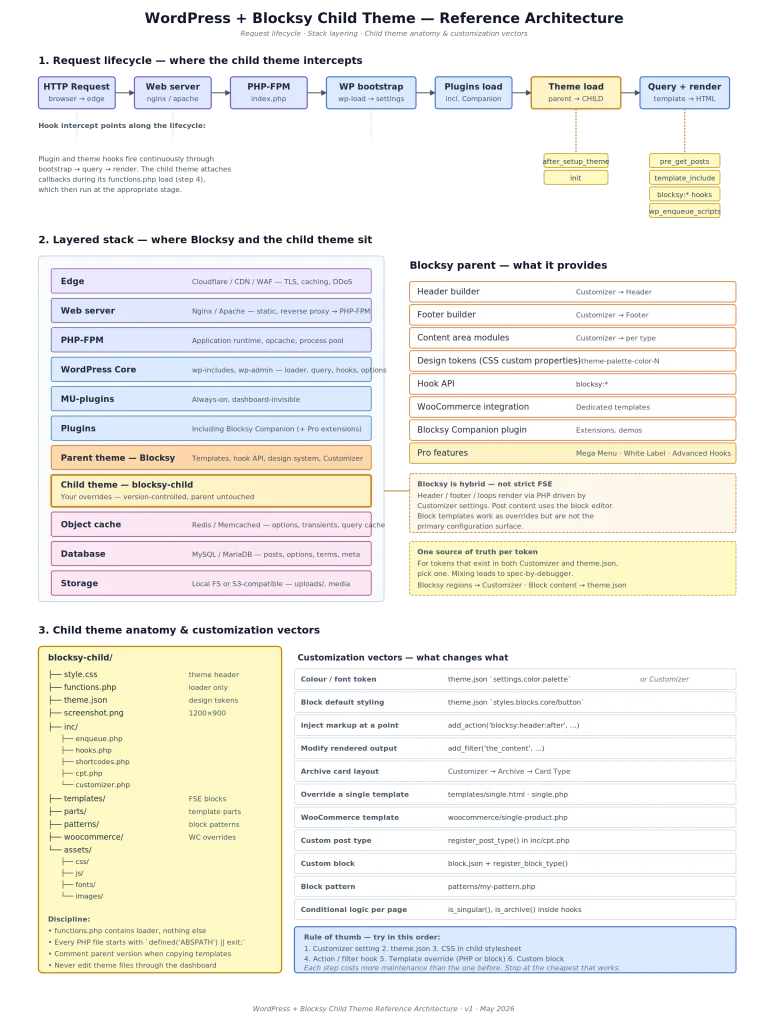
17. Further Reading
- WordPress Developer Resources — Theme Handbook and Block Editor Handbook
- Blocksy documentation —
creativethemes.com/blocksy/docs theme.jsonreference — Block Editor Handbook → Reference Guides- WP-CLI handbook —
wp-cli.org/ - Plugin API reference —
developer.wordpress.org/plugins/hooks/
Reference architecture, May 2026. Verify version-specific behaviour against the WordPress core, Blocksy, and Blocksy Companion versions in your environment.

0 comments